

Authorization policies
A policy decides which documents a caller may touch. It is the layer that makes a multi-user app safe, and the one place worth reading carefully before you ship.
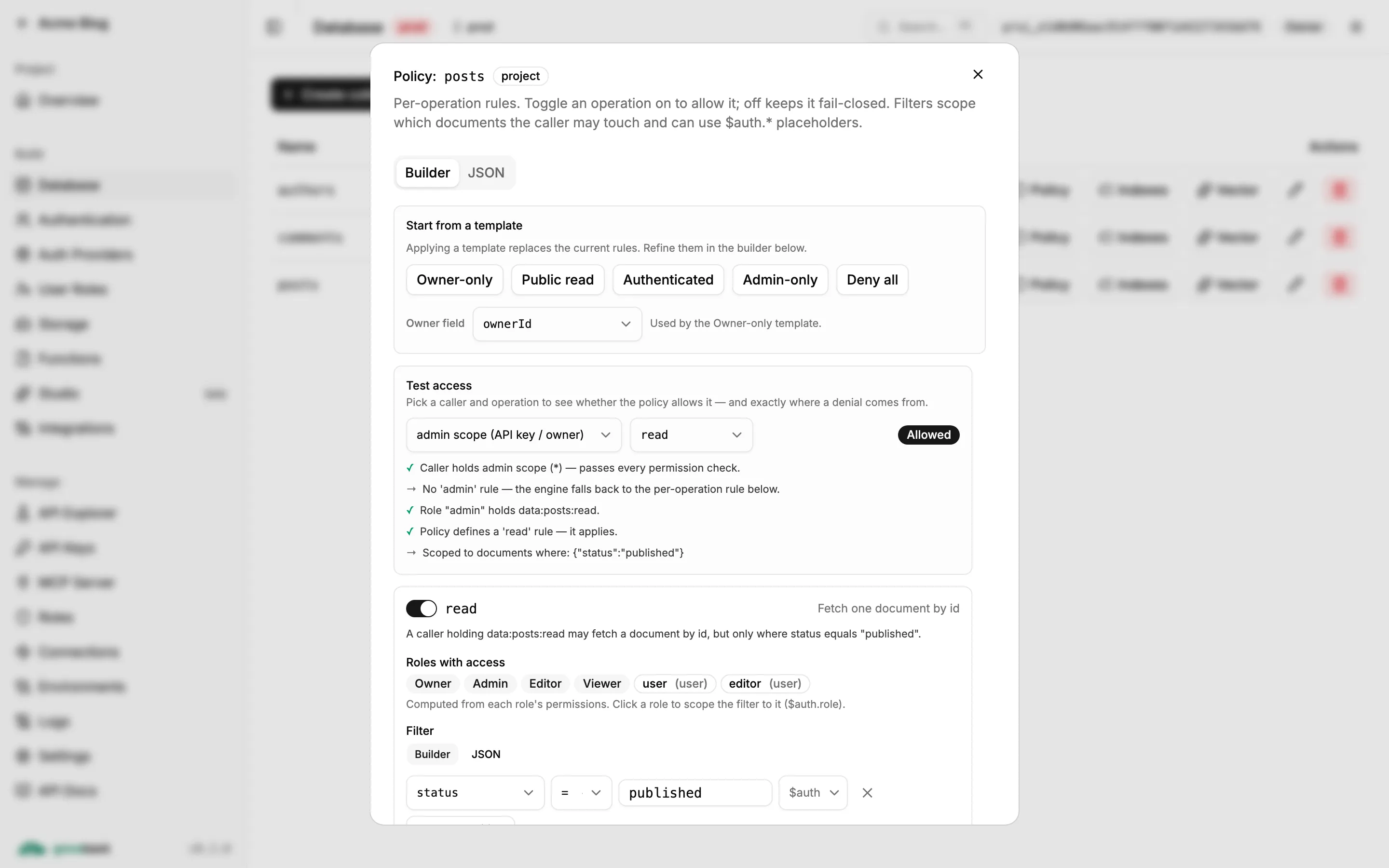
Why filters, not code
Section titled “Why filters, not code”Postgres has row-level security; MongoDB does not. The naive workaround — fetch documents, then filter them in application code — breaks pagination (you cannot know how many rows survive without reading them all) and does not scale.
Groveback instead expresses a policy as a Mongo query fragment and injects it into the
real query with $and:
effectiveFilter = { $and: [ userFilter, policyFilter ] }Mongo enforces it natively, your indexes still apply, and limit/skip stay correct.
The rule set
Section titled “The rule set”A policy is keyed by operation. The operations are read, list, create, update,
delete, plus admin.
{ "read": { "filter": { "ownerId": "$auth.uid" } }, "list": { "filter": { "ownerId": "$auth.uid" } }, "create": { "validate": "document.title.size() > 0" }, "update": { "filter": { "ownerId": "$auth.uid" }, "immutableFields": ["ownerId", "slug"], "allowedWriteFields": ["title", "body"], "deniedReadFields": ["internalNotes"] }, "delete": { "filter": { "ownerId": "$auth.uid" } }, "admin": { "filter": {} }}| Key | Meaning |
|---|---|
filter |
A Mongo query fragment, $and-ed into the query. {} means no restriction. |
validate |
A CEL expression that must evaluate to true. For creates and updates. |
immutableFields |
Fields a write may not change once set. |
allowedWriteFields |
If present, an allowlist — anything else is rejected. |
deniedReadFields |
Stripped from every read, including realtime events. |
Placeholders
Section titled “Placeholders”Inside a filter, four placeholders interpolate from the caller’s context:
| Placeholder | Value |
|---|---|
$auth.uid |
The caller’s user id (or API key id). |
$auth.role |
The resolved role. |
$auth.pid |
The project id. |
$auth.token.<claim> |
A custom JWT claim. Only token takes a sub-path. |
An unresolvable placeholder denies the request. An anonymous caller hitting a rule with
$auth.uid gets nothing, rather than matching documents whose ownerId happens to be null.
Per-operation semantics
Section titled “Per-operation semantics”Two terms, borrowed from Firestore: resource is the existing document,
request.resource is the incoming one.
| Operation | What happens |
|---|---|
list / find |
The policy filter is $and-ed into the query. Pagination stays intact. |
read / get |
Same injection. A miss is 404, not 403 — existence is never revealed. |
create |
There is no existing resource, so validate runs against the incoming document, and ownerId is forced to auth.uid server-side. |
update |
The filter is injected into the match, so only authorized documents are touched, and the payload is rejected if it violates the field rules. |
delete |
The filter is injected into the match. |
PUT (full replacement) never orphans a document: id, ownerId and createdAt are
re-pinned from the existing document, so a PUT that omits ownerId keeps the original
owner.
Field-level rules
Section titled “Field-level rules”Field checks compare actual value diffs, so sending a field back unchanged is not a
mutation and does not trip immutableFields. This matters when a client does read → edit →
write with the whole object.
Update operators are checked too — $set, $inc and $push are all validated against the
same field rules, so you cannot sneak past with $inc on an immutable counter.
CEL validation
Section titled “CEL validation”For write conditions a filter cannot express, validate takes an expression in a hardened
CEL subset — essentially what Firebase Security Rules use, with no dependencies and no
prototype access.
{ "create": { "validate": "document.price > 0 && document.currency in ['USD','EUR']" } }Limits worth knowing: at most 4096 characters, 1024 tokens, a parse depth of 64, and 10,000 evaluation steps.
A CEL error, or any result other than true, rejects the write.
Fail-closed, exactly
Section titled “Fail-closed, exactly”This is the part to internalize:
- No policy on a collection ⇒ the collection does not exist on the data plane for non-admin callers.
- No rule for the operation and no
adminrule ⇒ deny, even for a caller holding*. Policy shape gates admins too. - An unresolvable placeholder ⇒ deny.
- A CEL error ⇒ deny.
The only way past a policy is the admin document browser
(/api/v1/admin/collections/:name/documents), which is admin-gated, bypasses policy filters
deliberately — and still runs schema validation on writes.
Common shapes
Section titled “Common shapes”Per-owner private data. The default for user-owned records:
{ "read": { "filter": { "ownerId": "$auth.uid" } }, "list": { "filter": { "ownerId": "$auth.uid" } }, "create": {}, "update": { "filter": { "ownerId": "$auth.uid" }, "immutableFields": ["ownerId"] }, "delete": { "filter": { "ownerId": "$auth.uid" } }}Public read, owner write. A blog:
{ "read": { "filter": { "published": true } }, "list": { "filter": { "published": true } }, "create": {}, "update": { "filter": { "ownerId": "$auth.uid" } }, "delete": { "filter": { "ownerId": "$auth.uid" } }}Admin only. Right when a trusted server of yours is the only caller:
{ "admin": {} }Multi-tenant by claim. When your users belong to organizations:
{ "read": { "filter": { "orgId": "$auth.token.org" } }, "list": { "filter": { "orgId": "$auth.token.org" } }}Deny all, which is what BYO-Mongo import writes as a starting point:
{ "read": { "filter": { "$expr": false } }, "list": { "filter": { "$expr": false } } }Validation happens when you save
Section titled “Validation happens when you save”An unknown rule key, a malformed placeholder, or a CEL expression that does not compile is
rejected at PUT …/policy time — not silently at the first denial. A typo fails loudly,
while you are looking at it.
Two non-negotiables
Section titled “Two non-negotiables”Index every field a filter mentions. A policy filter on an unindexed ownerId turns
every authorized list into a collection scan. This is the single most common performance
mistake with policies.
curl -X POST "$URL/api/v1/admin/collections/posts/indexes" \ -H "authorization: Bearer $ADMIN_KEY" -H 'content-type: application/json' \ -d '{"keys":{"ownerId":1}}'Policies apply to realtime too. The read rule is re-evaluated against every Change Stream event before it is emitted. See realtime.
Setting a policy
Section titled “Setting a policy”Through the API:
curl -X PUT "$URL/api/v1/admin/collections/posts/policy" \ -H "authorization: Bearer $ADMIN_KEY" -H 'content-type: application/json' \ -d '{"rules":{"read":{"filter":{"ownerId":"$auth.uid"}}}}'In the bundle, as the policy key of groveback/collections/posts.json. Or in the dashboard,
whose collection wizard writes correct rules for you from a template — Public,
Private (per owner), Admin-only writes or Custom. That template step is the part most
worth doing in the UI.
Reading a policy back tells you where it came from:
{ "policy": { … }, "source": "own" }source is own (set on this project), inherited, or default (from the deployment’s
groveback.policies.json file).